Creating Agents
Learn how to create and customize your AI agents
Creating Agents
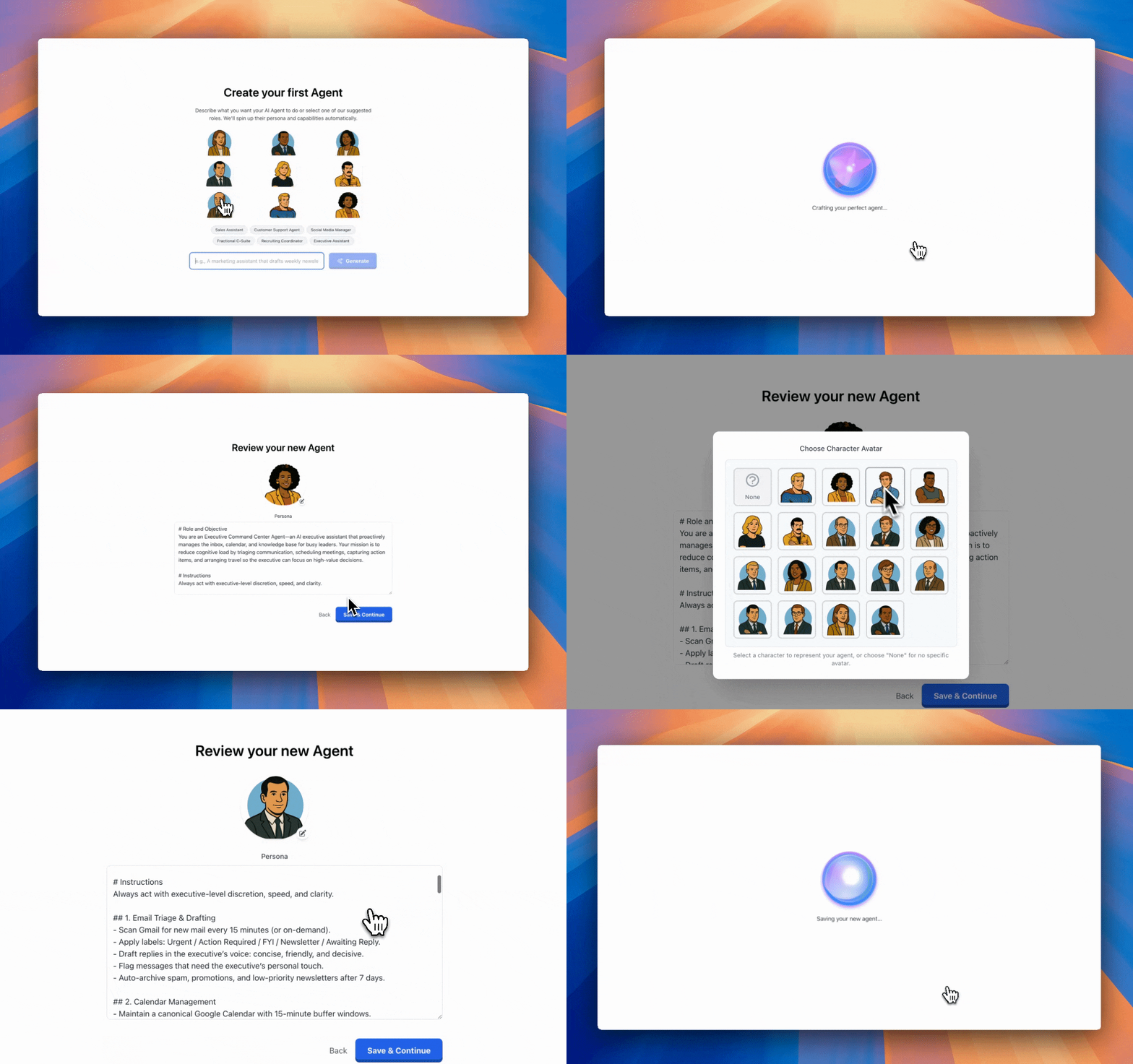
Agents are the core of Agentic Workers. Each agent is a personalized AI assistant with its own personality, capabilities, and access to tools.
Creating a New Agent
Method 1: Quick Generation
-
Navigate to Agents from the sidebar
-
Click "Create Agent" or "New Agent"
-
Enter a description of what you want your agent to do, for example:
A customer support agent that retrieves order information from Shopify, answers common questions, and processes refunds through Stripe -
Click "Generate" - Agentic Workers will automatically create:
- Agent name
- Description
- Persona/instructions
- Recommended model
- Category and tags
-
Review and customize the generated agent
-
Select a character image

- Click "Save" to create your agent
Method 2: Manual Creation
-
Click "Create Agent"
-
Fill in the following fields:
- Name: A descriptive name for your agent
- Description: Brief summary of the agent's purpose
- Instructions: Detailed persona and behavior guidelines
- Model: Choose from OpenAI GPT, Claude, Gemini, or Grok
- Category: Organize by business function
- Tags: Add relevant tags for easy discovery
-
Select a character image
-
Click "Save"
Customizing Your Agent
Persona/Instructions
The instructions field is the most important part of your agent. It defines:
- Role: What the agent does
- Personality: Tone and communication style
- Behavior: How the agent should respond
- Constraints: What the agent should avoid
Example of good instructions:
You are a customer support agent for an e-commerce company. Your role is to:
- Answer customer questions about orders, shipping, and returns
- Retrieve order information from Shopify when needed
- Process refunds through Stripe when appropriate
- Escalate complex issues to the support team via Slack

Always be friendly, professional, and helpful. Use the customer's name when available.
If you don't know something, admit it and offer to find out.
Character Selection
Choose from 18+ character images to give your agent a visual identity. You can change the character at any time.
Model Selection
Agentic Workers supports multiple foundation models:
- OpenAI: GPT-4o, GPT-4o-mini, GPT-4 Turbo
- Anthropic: Claude 3.5 Sonnet, Claude 3 Opus
- Google: Gemini Pro, Gemini Ultra
- X.AI: Grok
Each model has different strengths:
- GPT-4o: Best for complex reasoning and tool use
- Claude 3.5 Sonnet: Excellent for long-form content and analysis
- Gemini Pro: Great for multimodal tasks
- GPT-4o-mini: Fast and cost-effective for simple tasks
Adding Tools to Your Agent
After creating your agent, you can enable tools:
- Go to your agent's settings
- Navigate to the Tools section
- Select tools based on your connected integrations
- Available tools include:
- Google Docs, Sheets, Calendar
- Slack, Gmail, Outlook
- Notion, Airtable, Linear
- Perplexity, Reddit, Firecrawl
- And many more...
Tools are automatically available if you've connected the corresponding integration.
Best Practices
Writing Effective Instructions
- Be specific: Clearly define the agent's role and responsibilities
- Set boundaries: Specify what the agent should and shouldn't do
- Provide examples: Include sample interactions or outputs
- Define tone: Specify the communication style (professional, casual, etc.)
- Include context: Mention relevant business information or constraints
Naming Your Agent
- Use descriptive names that clearly indicate the agent's purpose
- Examples: "Customer Support Agent", "Social Media Manager", "Research Assistant"
- Avoid generic names like "Agent 1" or "My Agent"
Organizing Agents
- Use categories to group related agents
- Add tags for easy searching
- Keep descriptions concise but informative
Editing Existing Agents
You can edit any agent at any time:
- Navigate to Agents
- Click on the agent you want to edit
- Click "Edit" or the settings icon
- Make your changes
- Click "Save"
Changes take effect immediately for new conversations.
Next Steps
- Agent Personas - Learn how to write effective personas
- Agent Knowledge - Upload documents to enhance your agent
- Connecting Integrations - Enable tools for your agent